
A browser can reveal much more about its environment than most people realize.
When you open a website, your browser does not simply say, “I am Chrome.” Depending on the browser, device, permissions, APIs and site configuration, a website may be able to observe a combination of characteristics such as the browser environment, operating system information, screen properties, language, time zone, graphics capabilities, and other signals.
When these signals are combined, they can form a browser fingerprint: a collection of observable characteristics that can help a website distinguish one browser environment from another.
That is the basic idea behind browser fingerprinting.
Unlike a cookie, a fingerprint does not depend on storing a unique identifier in your browser. Instead, it is derived from characteristics that the browser makes observable to websites.
This makes browser fingerprinting useful for several legitimate purposes—including fraud detection, security, compatibility, and abuse prevention—but it also creates important privacy considerations. W3C describes fingerprinting as the ability of a site to identify or re-identify a user agent or device through observable characteristics or configuration settings.
In this guide, we will break down how browser fingerprinting works, what signals can contribute to a fingerprint, why changing an IP address does not necessarily change a fingerprint, and why consistency between fingerprint signals matters when working with isolated browser environments.
Browser Fingerprinting in One Sentence
Browser fingerprinting is the process of identifying or distinguishing a browser environment by analyzing a combination of characteristics that a website can observe.
The important word is combination.
A screen resolution by itself usually tells a website very little.
A browser version by itself tells it more.
A browser version combined with operating-system information, language, time zone, graphics characteristics and other observable signals can create a much more distinctive profile.
This is why a browser fingerprint should not be thought of as one number.
It is better understood as a set of signals that describes a browser environment.
How Does Browser Fingerprinting Work?
At a high level, the process looks like this:
Browser
   ↓
Observable signals
   ↓
Fingerprint data
   ↓
Signal combination
   ↓
Browser fingerprint
   ↓
Comparison with previous observations
A website can collect some information directly from the HTTP request and may obtain additional information through browser APIs and JavaScript.
For example, HTTP requests can contain information such as the User-Agent and other headers, while JavaScript-accessible browser capabilities can expose additional characteristics.
EFF's Cover Your Tracks project demonstrates how a browser fingerprint can incorporate many different characteristics, including screen properties, time zone, language, platform, Canvas and WebGL measurements, AudioContext information, hardware-related signals and other browser characteristics.
The important point is that no single signal necessarily identifies a browser.
The value comes from the combination.
What Information Can Be Part of a Browser Fingerprint?
There is no universal list containing every fingerprinting signal.
The available signals depend on the browser, operating system, device, APIs, permissions, website implementation and browser privacy protections.
However, common categories include the following.
1. Browser and User-Agent Information
Historically, websites have relied heavily on the User-Agent string to identify the browser, operating system and related information.
For example, a User-Agent can communicate information about the browser and platform.
However, modern browsers have reduced some of the information exposed through traditional User-Agent strings as part of broader privacy efforts. MDN notes that User-Agent reduction removes certain information such as the exact platform version, device model and minor browser version in supporting browsers.
This is important because fingerprinting is evolving.
A modern fingerprint is not simply:
"Read the User-Agent and identify the user."
Instead, websites can combine multiple signals.
2. Screen Characteristics
Screen-related information can provide additional context about a browser environment.
Depending on the browser and APIs available, websites may observe characteristics such as:
- screen dimensions
- available screen dimensions
- color depth
- pixel-related properties
- device pixel ratio
- viewport dimensions
One screen configuration may be common.
But a particular combination of screen characteristics and other signals can become more informative.
This is an important principle throughout fingerprinting:
Signals become more useful when considered together.
3. Language and Time Zone
A browser may expose information about the user's language preferences and time-zone configuration.
For example:
Language: en-US
Time zone: America/New_York
These values are not inherently unique.
Millions of people may share them.
But suppose they are combined with a particular operating-system environment, browser configuration, screen characteristics and graphics stack.
The resulting combination becomes more distinctive.
4. Canvas Fingerprinting
Canvas fingerprinting is one of the most well-known browser fingerprinting techniques.
The basic idea is surprisingly simple.
A website can ask the browser to render specific graphics or text using the HTML Canvas API and then examine the resulting output.
Small differences in the rendering process can arise from differences in:
- operating systems
- browsers
- graphics hardware
- drivers
- rendering implementations
- system configuration
The resulting image or data can then be transformed into a value that can be compared between browser environments.
EFF's browser fingerprinting research includes Canvas-derived measurements among the characteristics used to assess browser uniqueness.
Why does Canvas matter?
Because the browser is not only revealing what it claims to be.
It can also reveal aspects of how it behaves.
That distinction becomes extremely important when analyzing browser fingerprints.
5. WebGL Fingerprinting
WebGL provides another source of information.
WebGL allows browsers to interact with graphics hardware through web APIs, and websites can use WebGL-related behavior and information as part of fingerprinting.
Among the characteristics that fingerprinting systems may examine are graphics-related information such as:
- WebGL rendering behavior
- vendor information
- renderer information
- supported capabilities
EFF's Cover Your Tracks measurements include both a WebGL fingerprint and WebGL vendor/renderer information.
This makes WebGL particularly relevant when thinking about the relationship between:
browser → operating system → graphics stack → device
6. AudioContext Fingerprinting
Graphics are not the only source of behavioral information.
Audio APIs can also expose characteristics of how the browser processes audio operations.
This technique is commonly known as AudioContext fingerprinting.
Like Canvas and WebGL, AudioContext information becomes more useful when combined with other signals rather than viewed in isolation.
EFF includes AudioContext among the browser characteristics measured by its Cover Your Tracks fingerprinting tests.
7. Hardware-Related Signals
Depending on browser support and permissions, websites may also observe information related to the device environment.
Examples can include:
- hardware concurrency
- device memory
- touch capability
- graphics characteristics
- platform information
Again, these values are generally not equivalent to a unique serial number.
Their value comes from the combination of signals.
8. Browser Capabilities and Configuration
A browser exposes capabilities because websites need them to function.
For example, a website may need to know whether a browser supports a particular API or feature.
Some of these characteristics can also contribute to a fingerprint.
The result is an interesting privacy trade-off:
The browser needs to expose enough information to make the modern web work, while exposing as little unnecessary information as possible.
This tension is one reason browser fingerprinting remains an active area of privacy research.
W3C specifically notes that exposing browser settings and characteristics can create privacy risks and provides guidance for reducing those risks when designing web specifications.
9. Client Hints
Browser fingerprinting is also evolving alongside changes to traditional User-Agent information.
User-Agent Client Hints, commonly called UA-CH, provide websites with browser and platform information through HTTP headers and JavaScript APIs.
Instead of exposing everything through one traditional User-Agent string, Client Hints allow information to be requested in a more structured way.
MDN explains that User-Agent Client Hints divide information into different levels, including lower-entropy and higher-entropy hints, with additional information subject to browser-controlled mechanisms.
This matters for modern fingerprinting because reducing the traditional User-Agent string does not mean that all browser and device signals disappear.
The fingerprinting landscape changes as browsers change.
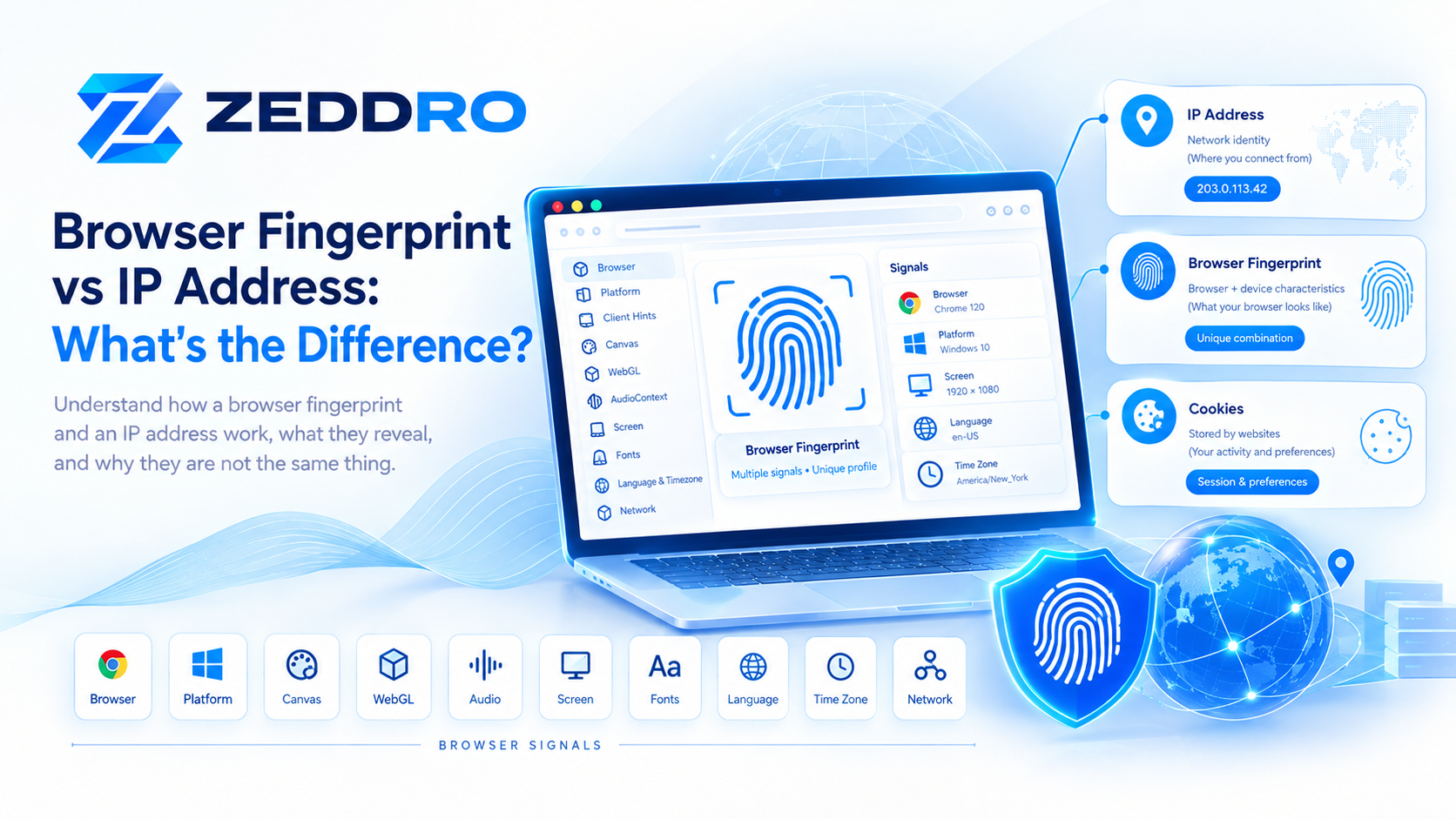
Is a Browser Fingerprint the Same as an IP Address?
No.
An IP address and a browser fingerprint describe different aspects of an online connection.
An IP address generally relates to the network endpoint through which traffic reaches a website.
A browser fingerprint describes characteristics of the browser and device environment that are observable to the website.
Think of it this way:
IP address
    ↓
Where the connection appears to come from

Browser fingerprint
    ↓
What the browser environment looks like
A website can potentially observe both.
That means changing one does not automatically change the other.
For example:
Changing an IP address does not automatically create a different browser fingerprint.
Likewise:
Changing a browser configuration does not automatically change the network address.
This distinction is fundamental when analyzing browser environments.
Browser Fingerprint vs Cookies
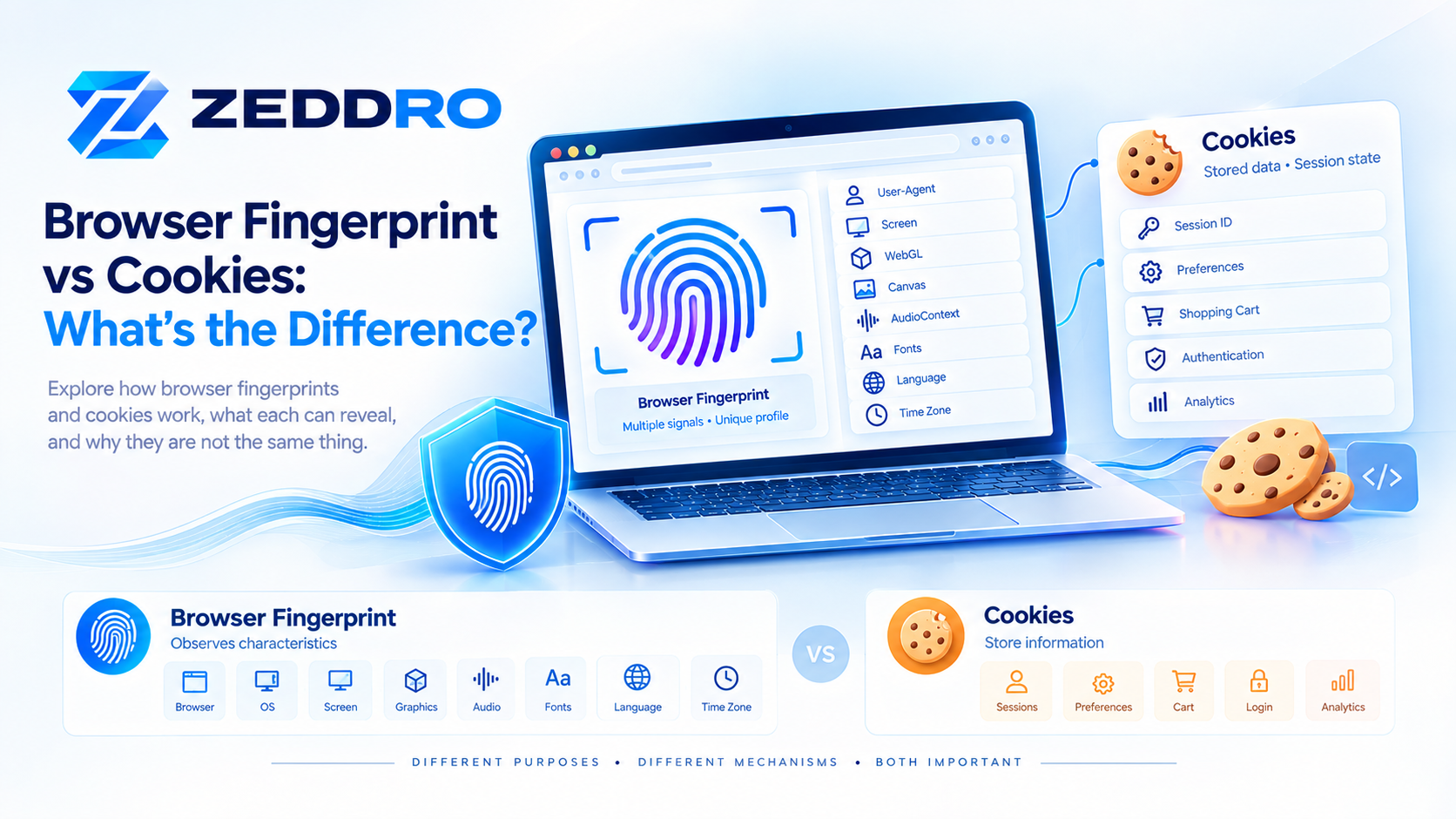
Cookies and fingerprints are also fundamentally different.
Cookies
A website can store information in the browser.
For example:
Browser
   ↓
Website
   ↓
Cookie stored
   ↓
Browser returns later
   ↓
Cookie is sent again
Fingerprinting
Fingerprinting works differently:
Browser
   ↓
Observable characteristics
   ↓
Website analyzes signals
   ↓
Fingerprint generated/compared
EFF explains the distinction clearly: cookies are stored pieces of information that can be deleted, while fingerprinting relies on characteristics of the browser configuration and hardware environment.
This is why deleting cookies does not necessarily eliminate fingerprint-based identification.
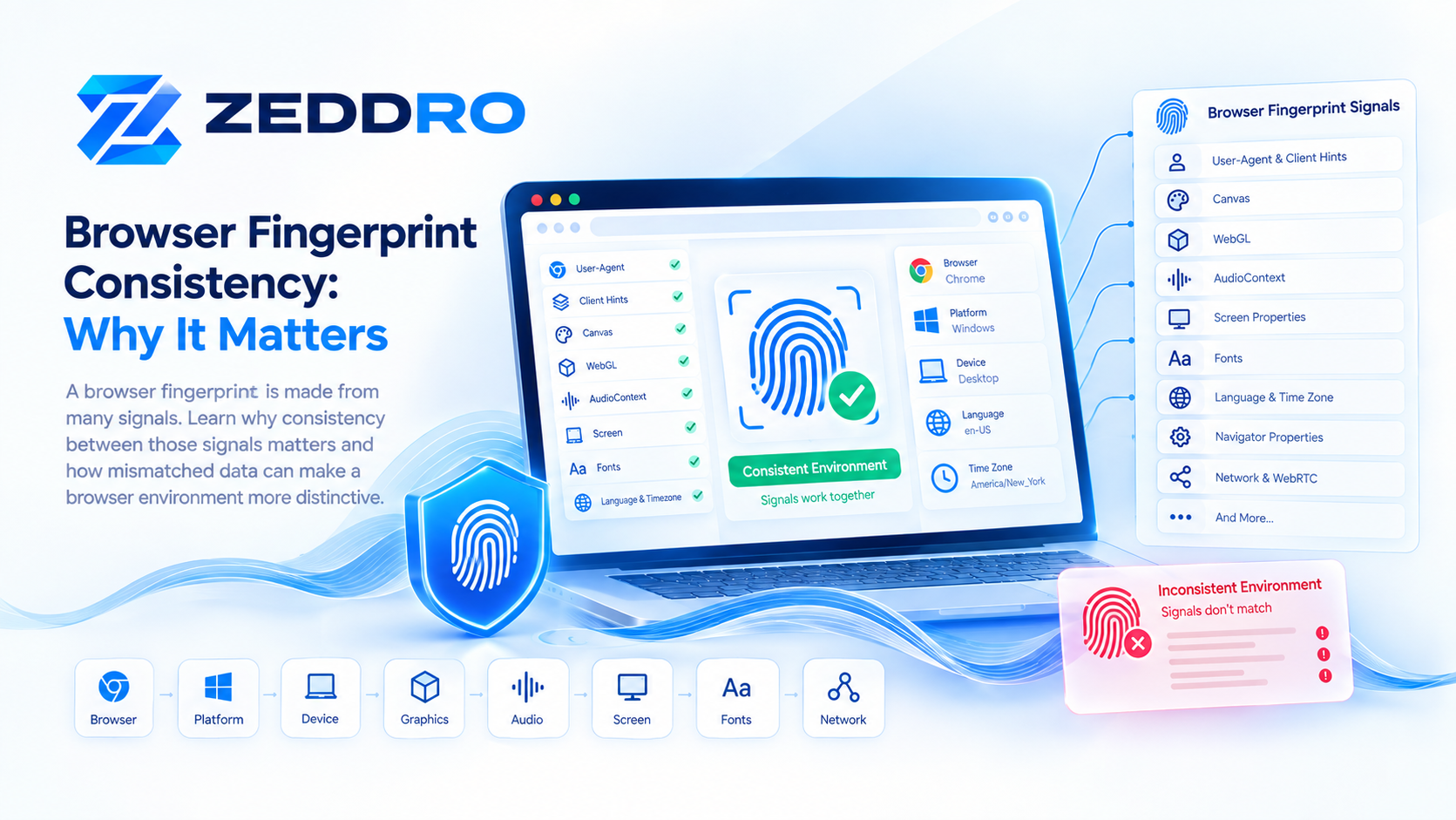
Why Fingerprint Consistency Matters
This is one of the most misunderstood parts of browser fingerprinting.
A fingerprint is not just about having many different values.
The values should also make sense together.
Imagine a browser environment reporting:
Browser: Chrome
Operating system: Windows
Graphics renderer: consistent with Windows environment
Language: English
Time zone: New York
Screen configuration: desktop
The signals form a coherent environment.
Now imagine another environment where the browser claims to be one platform while several other observable characteristics strongly suggest another.
That combination can become unusual.
This is why simply changing individual fingerprint attributes is not necessarily an effective approach.
EFF's research makes a similar point: modifying individual characteristics can sometimes create a more distinctive combination rather than making a browser less identifiable.
The key concept
A believable fingerprint is not simply a random fingerprint.
It is a coherent browser environment.
That distinction becomes especially important when managing isolated browser profiles.
What Is Fingerprint Entropy?
The word entropy appears frequently in technical discussions about fingerprinting.
In simple terms, fingerprint entropy describes how much information a collection of characteristics provides for distinguishing one browser from others.
Consider two signals:
Operating system: WindowsMillions of browsers may share this.
Now consider a much larger combination:
Operating system
+ browser version
+ screen configuration
+ language
+ time zone
+ graphics characteristics
+ Canvas result
+ WebGL result
+ other observable properties
The combination may be considerably less common.
The more distinctive the combination, the more useful it can become for distinguishing browser environments.
However, "high entropy" does not automatically mean "personally identified."
Fingerprinting can distinguish or re-identify a browser environment without necessarily knowing the person's real-world name.
That distinction is important.
Why Do Websites Use Browser Fingerprinting?
Fingerprinting is not inherently malicious.
There are legitimate uses.
Security
A website may use browser and device characteristics as one signal in detecting suspicious activity.
Fraud Prevention
Financial services, marketplaces and other platforms may use device or browser signals as part of fraud detection systems.
Account Security
Fingerprint-related signals can contribute to risk assessment when a login occurs from an unusual environment.
Bot and Abuse Detection
Websites can combine browser characteristics with other signals to identify automated or suspicious traffic.
Analytics and Tracking
Fingerprinting can also be used for tracking and profiling, which is where privacy concerns become more significant.
W3C recognizes both legitimate security-related uses and the privacy risks associated with browser fingerprinting.
Can a Browser Fingerprint Be Changed?
Yes, browser fingerprints can change—but changing one value does not necessarily mean creating a genuinely different browser environment.
A fingerprint is a combination of observable characteristics.
Changing the browser version may change some signals.
Changing the operating system may change others.
Changing the graphics environment can affect additional characteristics.
But these changes can also create inconsistencies if the resulting signals no longer form a coherent environment.
This is why fingerprint management is fundamentally different from simply editing a few browser properties.
The real challenge is maintaining a consistent environment across the signals a website can observe.
What Is an Anti-Detect Browser?
An anti-detect browser is a browser environment designed to isolate browser profiles and control or manage the characteristics exposed by each profile.
Instead of having one browser environment shared across every account, an anti-detect browser can provide separate profiles.
Conceptually:
Computer
│
├── Profile A
│   ├── Cookies
│   ├── Local storage
│   ├── Browser settings
│   └── Fingerprint environment
│
├── Profile B
│   ├── Cookies
│   ├── Local storage
│   ├── Browser settings
│   └── Fingerprint environment
│
└── Profile C
    ├── Cookies
    ├── Local storage
    ├── Browser settings
    └── Fingerprint environment
The purpose is environment isolation and management.
This is particularly useful for legitimate workflows where different projects, clients, teams or business environments need to remain separated.
Browser Profiles vs Incognito Mode
These are not the same thing.
Incognito/private browsing is primarily designed to reduce local traces such as browsing history and certain locally stored data after a private session ends.
It does not automatically create a completely independent browser environment with a separate network identity or an entirely different fingerprint.
EFF explicitly notes that private/incognito browsing was not designed to prevent remote websites or trackers from identifying a browser.
A dedicated browser profile is a different concept:
Profile isolation focuses on keeping browser environments separate.
That distinction is important for anyone managing multiple independent workflows.
Does Changing the IP Address Change the Browser Fingerprint?
No.
This is one of the most common misconceptions.
Imagine:
Profile
   ↓
Browser fingerprint A
   ↓
IP address A
If you change only the network connection:
Profile
   ↓
Browser fingerprint A
   ↓
IP address B
The IP changed.
The browser environment did not necessarily change.
The same browser can therefore continue exposing the same or similar fingerprint characteristics while connecting from a different IP address.
This is why network identity and browser identity should be treated as separate layers.
A Better Mental Model: The Browser Identity Stack
Instead of thinking about identity as a single value, think about it as layers.
┌───────────────────────────────┐
│        Website Session        │
├───────────────────────────────┤
│ Cookies / Local Storage       │
├───────────────────────────────┤
│ Browser Configuration         │
├───────────────────────────────┤
│ Fingerprint Signals           │
├───────────────────────────────┤
│ Device / OS Environment       │
├───────────────────────────────┤
│ Network / IP                  │
└───────────────────────────────┘
Each layer answers a different question.
Network: Where does the connection appear to originate?
Device: What kind of environment is being used?
Browser: What software and capabilities are exposed?
Fingerprint: What combination of observable characteristics describes this environment?
Session: What information persists between visits?
This layered model is more useful than thinking about "the fingerprint" as a single identifier.
Why Fingerprint Consistency Is More Important Than Randomization
A common misconception is:
"The more random the fingerprint, the safer it is."
That is too simplistic.
Suppose a browser reports a combination of characteristics that almost never occurs naturally.
Randomness can actually create a rare configuration.
And rare configurations can be easier to distinguish.
The objective should therefore not simply be:
Maximum randomness.
A better objective is:
Controlled, coherent and stable browser environments.
This is one of the central ideas behind modern browser-profile architecture.
How Browser Fingerprinting Is Evolving in 2026
Browser fingerprinting is not a static technology.
Browsers continue to change which information websites can access and how that information is exposed.
Three trends are particularly important.
1. User-Agent Reduction
Browsers have reduced some detailed information historically exposed through User-Agent strings.
2. Client Hints
Websites can request certain browser and device information through structured Client Hint mechanisms.
3. Privacy Mitigations
Browser vendors and web standards organizations continue to investigate ways to reduce the privacy impact of fingerprinting.
W3C's fingerprinting guidance explicitly addresses how web specifications can balance functionality against fingerprinting risks.
This means the fingerprinting ecosystem in 2026 is better understood as a moving system of signals and mitigations, not a fixed checklist.
How Zeddro Approaches Browser Fingerprints
For businesses working with multiple independent browser environments, the challenge is not simply opening multiple browser windows.
The important question is:
Can each profile maintain its own coherent environment?
Zeddro is designed around this principle.
A Zeddro profile can maintain its own isolated browser environment, including profile-specific settings, cookies and proxy configuration, while fingerprint-related parameters are managed as part of the profile rather than treated as unrelated values.
This architecture is particularly useful for workflows where users need to keep multiple projects, accounts or client environments separated.
The objective is not to create arbitrary browser identities.
It is to provide controlled browser environments that remain isolated and manageable.
Browser Fingerprinting: The Short Version
If you only remember seven things from this guide, remember these:
- A browser fingerprint is a combination of observable browser and device characteristics.
- A fingerprint is not the same thing as an IP address.
- Cookies and fingerprints work differently.
- Canvas, WebGL, AudioContext, browser configuration and other signals can contribute to fingerprinting.
- Modern fingerprinting is increasingly about combinations of signals rather than one identifier.
- Changing one browser attribute does not necessarily create a coherent new environment.
- For isolated browser profiles, consistency between signals matters as much as controlling individual parameters.
Frequently Asked Questions
What is browser fingerprinting?
Browser fingerprinting is a technique for distinguishing or re-identifying a browser or device using a combination of observable characteristics and configuration settings.
Is browser fingerprinting the same as tracking cookies?
No. Cookies store information in the browser, while fingerprinting derives information from observable browser and device characteristics.
Can a browser fingerprint identify a person?
A fingerprint can help distinguish or re-identify a browser environment, but it does not inherently reveal a person's real-world identity. Additional information or identifiers may be needed to connect a browser to a specific person.
Does incognito mode prevent browser fingerprinting?
No. Private browsing primarily changes what is stored locally. It does not guarantee that remote websites cannot observe browser characteristics.
Does changing my IP change my browser fingerprint?
No. An IP address and browser fingerprint are different layers of the online environment.
What is Canvas fingerprinting?
Canvas fingerprinting uses the browser's Canvas rendering behavior to derive information that can contribute to a browser fingerprint.
What is WebGL fingerprinting?
WebGL fingerprinting uses characteristics of WebGL rendering and graphics capabilities as signals that can contribute to identifying or distinguishing a browser environment.
What is fingerprint consistency?
Fingerprint consistency refers to whether the different observable characteristics of a browser environment form a coherent and stable combination.
What is an anti-detect browser?
An anti-detect browser is a browser system designed to provide isolated profiles and manage the browser characteristics exposed by each profile.
Why does fingerprinting matter for multiple browser profiles?
Because isolated profiles are intended to represent separate browser environments. If important browser, device, session and network characteristics are mixed together, the separation between profiles can become less meaningful.
Final Takeaway
Browser fingerprinting is best understood not as a single identifier, but as a behavioral and technical profile assembled from many observable signals.
The difference between a weak understanding of fingerprinting and a useful one is recognizing that these signals do not exist independently.
Browser version, operating system, graphics characteristics, screen configuration, language, time zone, cookies, session data and network information can all form different layers of the environment a website observes.
That is why effective browser-profile management is less about changing random values and more about maintaining controlled, isolated and internally coherent environments.
As browsers continue to reduce some exposed information while introducing mechanisms such as Client Hints, fingerprinting will continue to evolve. The underlying principle, however, remains the same:
A browser can be recognized not only by what it says it is, but also by the collection of characteristics it reveals through its behavior and environmen